Everything New in BigSeller: October 2026 Recap
Erra02 Nov 2026 04:00ENCopy link & title
Some of these updates are about making existing workflows easier, while others bring new tasks into BigSeller so you don't have to manage everything separately. Let's take a look at what's new last month.

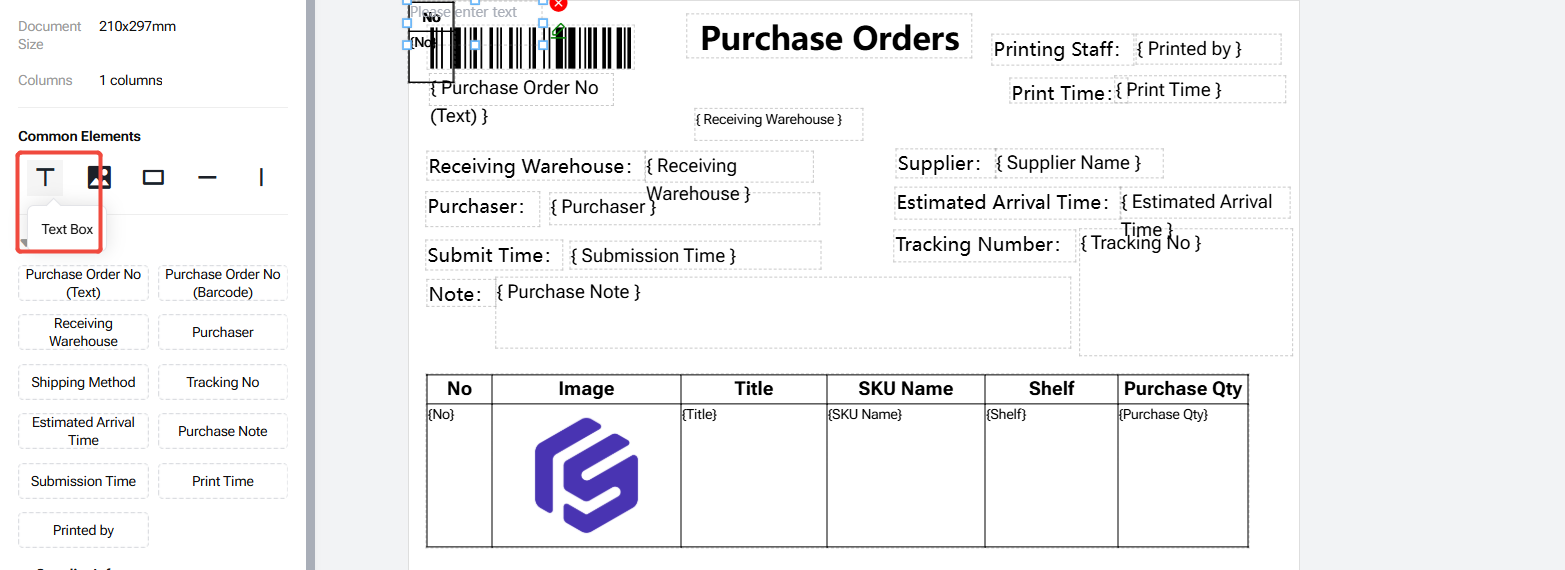
Customise Your Purchase Order Templates
Purchase orders can look different depending on how each business manages its purchasing process. Some businesses may need to include pricing details, while others prefer a simpler layout for their internal or supplier records.
With the new Customizable Purchase Order Templates feature, you can now adjust your purchase order template according to your requirements.
BigSeller provides a default template that you can copy and edit. You can customise the information displayed, including whether unit prices and amounts should appear on the printed purchase order. You can also add custom text in your preferred language to match your business needs.
Create Product Videos with AI Video Workspace
Product videos are useful for introducing new products and promoting them across different markets. However, preparing the scripts, editing the videos, and recording voiceovers can take quite a bit of time.
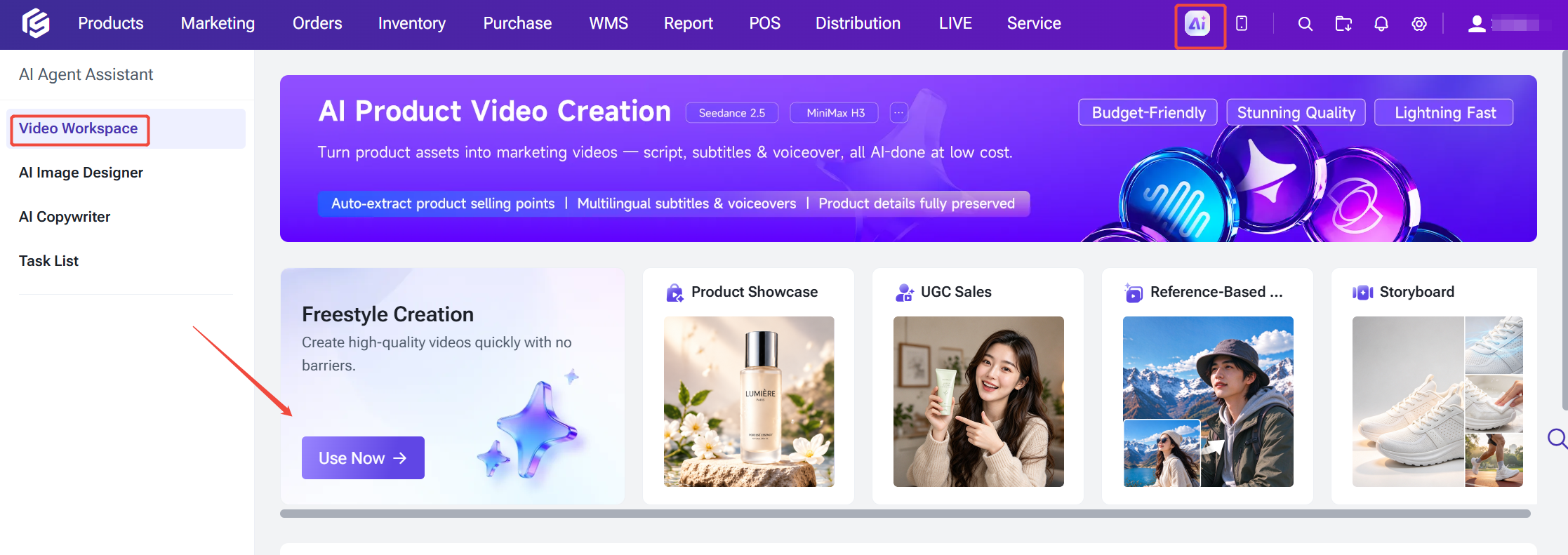
BigSeller's new AI Video Workspace makes the video creation process easier by turning product information and assets into videos. You can select products directly from BigSeller or upload your own materials. The AI will identify key selling points from the product information and generate video scripts to get you started.
There are also several creation modes to choose from, depending on the type of content you want to produce:
-
Product Showcase: Create videos that highlight your products.
-
UGC Marketing: Create user-generated content-style marketing videos.
-
Reference Video: Use an existing video as a reference.
-
Storyboard: Build your video around a storyboard.
-
Free Creation: Create videos with more flexibility.
To reach customers in different markets, you can also select voiceover and subtitle languages when creating your videos.
More Flexible Auto-Ship Settings for Warehouse Waves
Different warehouses have different fulfilment workflows. Some prefer scanning every package individually, while others may want orders to move to the next stage automatically once a picking wave is completed.
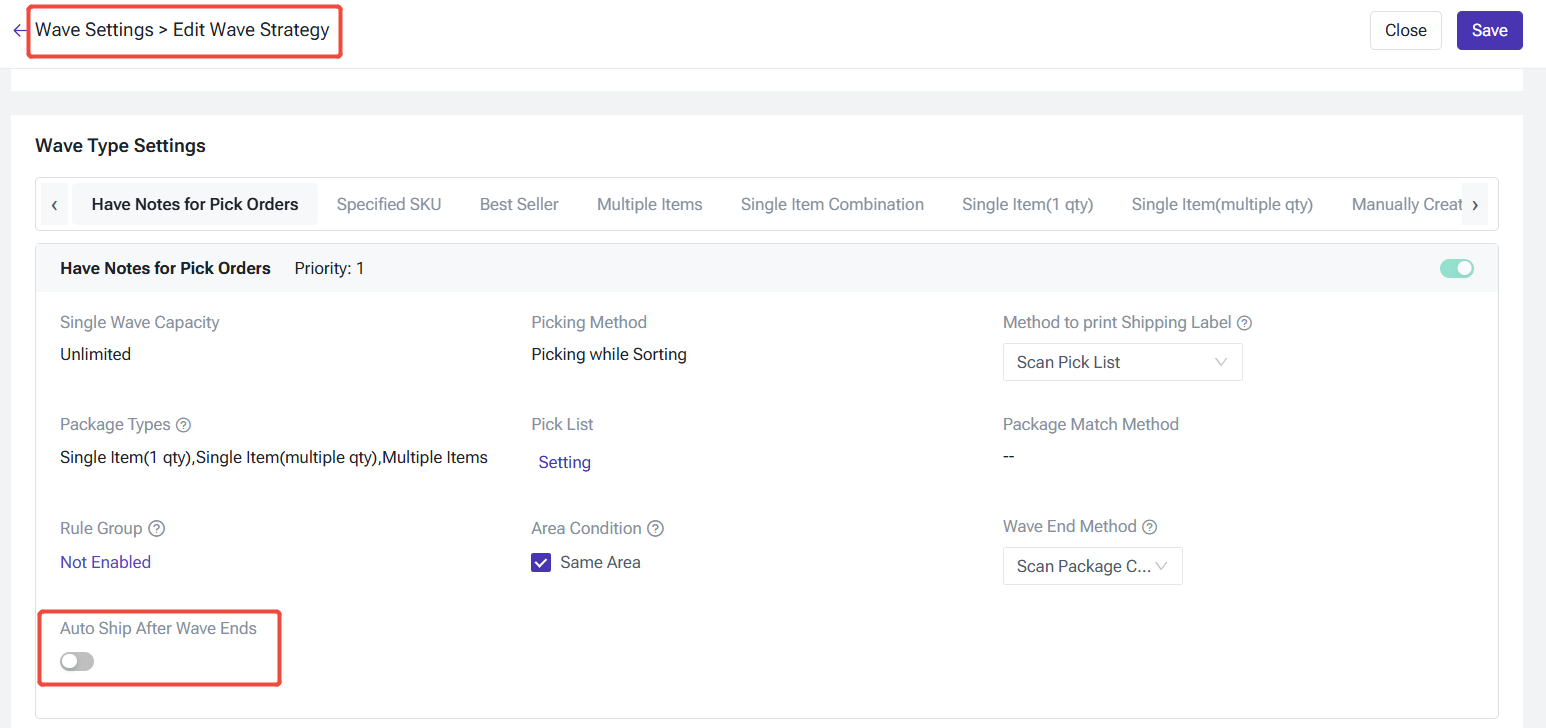
With the new Auto Ship After Wave Ends setting, BigSeller gives warehouses more flexibility in managing this process. You can configure automatic shipping based on the wave type. When enabled, orders will automatically move to To Pickup once the wave is completed, without requiring individual package scanning.
We've also added automatic removal of fully released packages. Once all SKU locks within a package have been released, the package will be removed from the wave. These improvements help reduce repetitive scanning and packing work, while giving warehouse teams more control over their fulfilment process.
Connect Shopee FBS with BigSeller
For sellers using Shopee's Fulfilled by Shopee (FBS) service, keeping track of platform warehouse operations is now easier with the new Shopee Marketplace Warehouse integration.
Once connected, Shopee marketplace warehouse inventory, stock age, orders, and after-sales data will be synced to BigSeller. You can manage these operations and check the relevant information directly from one system.
Here's what you can do with the integration:
Track platform warehouse inventory
View Shopee platform warehouse inventory details and stock aging information in BigSeller, making it easier to monitor the stock stored in Shopee's warehouse.
Identify FBS orders
FBS orders can now be identified in the order list and order exports. Their statuses will also update according to Shopee's platform statuses.
Calculate order costs
You can configure costs for platform warehouse SKUs directly. Once an order is handed over for shipment, BigSeller records its order cost based on the configured platform warehouse SKU cost.
Simplify return stock-in
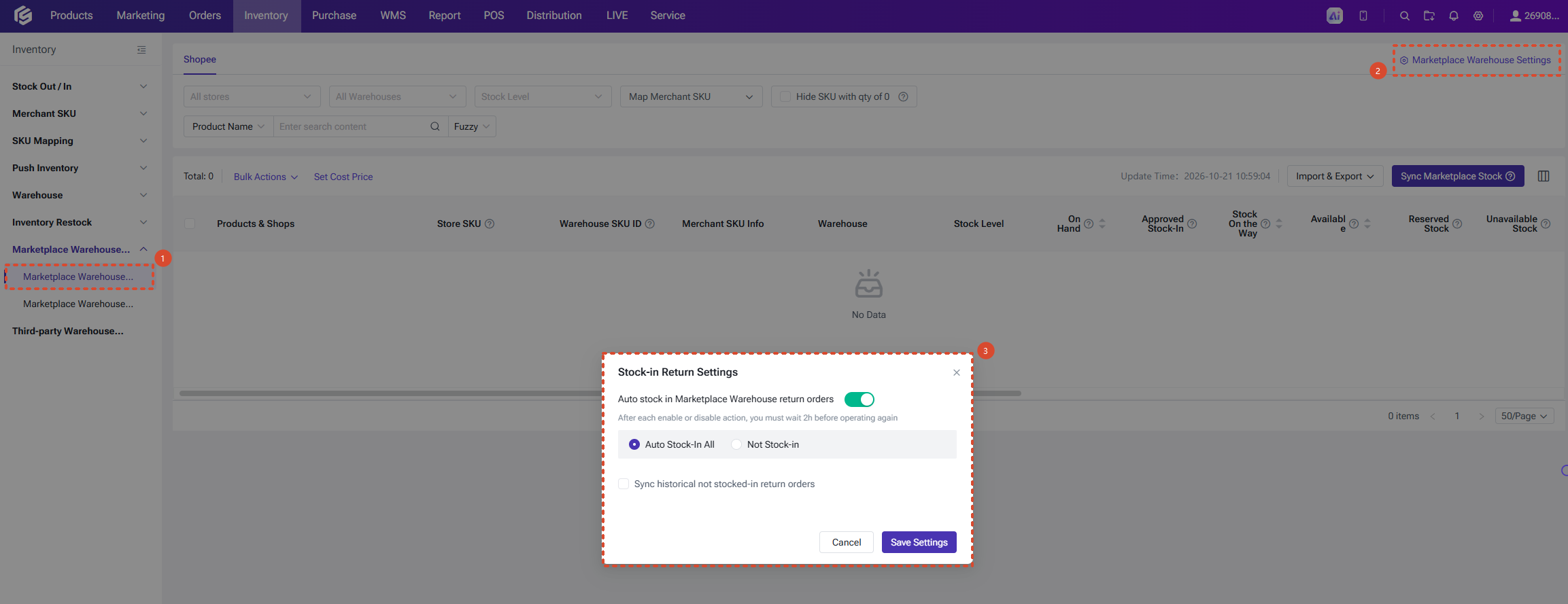
Under Marketplace Warehouse Settings, you can choose between Auto stock-in for all and No stock-in for returned products.
With these additions, sellers can keep track of more Shopee FBS activities alongside their other marketplace operations in BigSeller.
More Specific Product Permissions for Shopee, TikTok, and Lazada
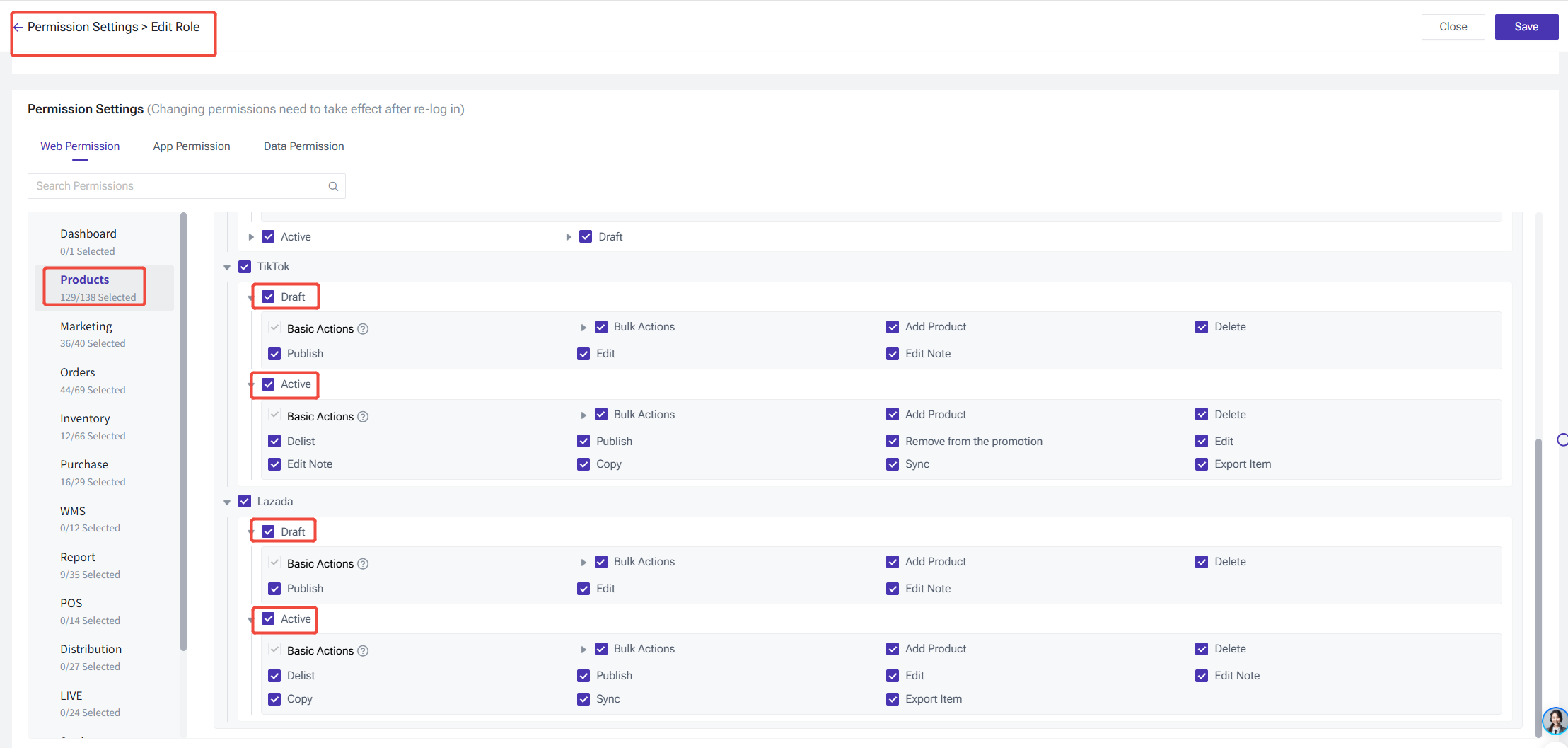
Managing product permissions is important when multiple team members are handling listings across different marketplaces. BigSeller has updated Permission Settings for Shopee, TikTok, and Lazada by separating access to the Drafts and Active product menus.
You can now configure permissions for each menu separately, including whether sub-accounts can edit product information, delete products, publish products, and perform other product-related actions.
This gives store owners more flexibility when assigning responsibilities to their teams and managing access to product listings.
Manage TikTok Creator Partnerships with Affiliate Center
Finding creators is only one part of running an affiliate campaign. Sellers also need to manage conversations, sample requests, shipments, and collaboration performance along the way. BigSeller's new TikTok Affiliate Center brings these activities together to make creator partnership management easier.
You can discover potential creators using filters such as product category and follower demographics to find creators who may be a good match for your products. Once you've found suitable creators, you can organise them under My Creators and use custom tags to manage your creator network. You can also keep records of communication history, sample requests, and shipping status.
For sample requests, you can review them in one place and approve or reject multiple requests in bulk. After the samples are sent, you can continue tracking sample shipments, order status, and related sales performance to keep an eye on each collaboration.
Whether you're building a new creator network or managing ongoing partnerships, the Affiliate Center gives you a more organised way to handle these activities.

That's a Wrap for October
From creating product videos with AI to managing creator partnerships and connecting Shopee FBS operations, October's updates cover quite a few different parts of running an online business.
What ties these improvements together is the idea of having fewer things to manage separately. Whether you're handling warehouse operations, product listings, marketing content, or creator collaborations, BigSeller continues to bring more of these workflows into one platform.
There's still plenty to work on as we move towards the final stretch of the year, and we'll keep sharing the improvements along the way.
See you in November!